Showing posts with label odi projects. Show all posts

MULTIPLE SOURCE FILES-MULTIPLE TARGET TABLES-SINGLE INTERFACE


We have seen in the last post how to load multiple source files of same structure into a single table.

Suppose if we want to load multiple source files into multiple target tables.
Then please just follow the same procedure which I explained in the previous post and do a little change to the target data store.
Open the source data store which is participating of the interface and replace the resource name with

#Project_Name.FILE_NAME


Note : Project_Name means your project name

Generate all scenarios in a project


Good concept of ODI11g.


There are some situations we may require to generate all scenarios for the following objects of a project
  1. all interfaces
  2. all procedures
  3. all packages
  4. all interfaces and procedures
  5. all interfaces and packages
  6. all procedures and packages
  7. all interfaces, procedures and packages
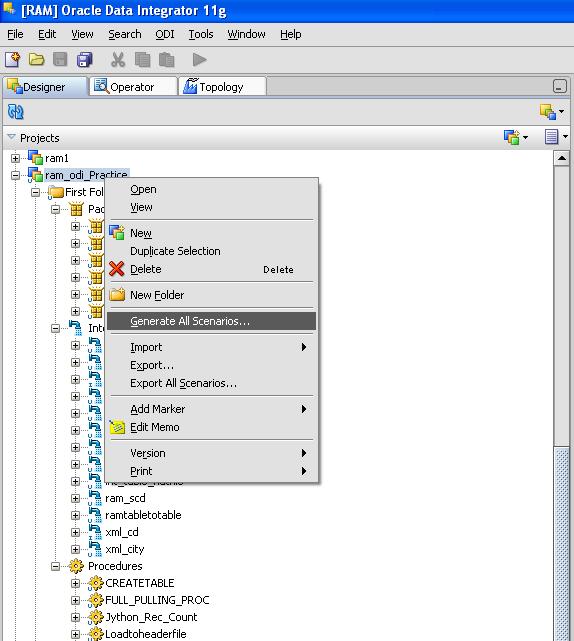
This can be achieved by the following method.

Go to the designer.


Select the required project to generate scenarios for.


Right click on the project name


click on generate scenarios.


Then the following window appears.
Then select the objects you want to generate scenarios.
click ok.


Generate all scenarios in a project


Today we are going to discuss a good concept of ODI11g.

There are some situations we may require to generate all scenarios for the following objects of a project
  1. all interfaces
  2. all procedures
  3. all packages
  4. all interfaces and procedures
  5. all interfaces and packages
  6. all procedures and packages
  7. all interfaces, procedures and packages
This can be achieved by the following method.

Go to the designer.


Select the required project to generate scenarios for.


Right click on the project name


click on generate scenarios.


Then the following window appears.
Then select the objects you want to generate scenarios.
click ok.


In this way we can generate all scenarios at a time.
Organizing the Project with Folders


In a project, interfaces, procedures and packages are organized into folders and sub-folders. It recommended to maintain a good organization of the project by using folders. Folders simplify finding objects developed in the project and facilitate the maintenance tasks.

Creating a New Project


create a project:


In Designer Navigator, click New Project in the toolbar of the Projects accordion.


Enter the Name of the project.


Keep or change the automatically-generated project Code. As this code is used to identify objects within this project, it is recommended to make this code for a compact string. For example, if the project is called Corporate Datawarehouse, a compact code could be CORP_DWH.


From the File menu, click Save.


The new project appears in the Projects tree with one empty folder.

Project Life Cycle


The project life cycle depends on the methods and organization of your development team. The following steps must be considered as guidelines for creating, working with and maintaining an integration project.

Create a new project and import Knowledge Modules for this project.

Define the project organization and practises using folders, markers and documentation.

Create reusable components: interfaces, procedures, variables, sequences. Perform unitary tests.

Assemble these components into packages. Perform integration tests.

Release the work in scenarios

Oracle Data Integrator Project Components


The following components are stored into a project. The appear in the in the Project accordion in the Designer Navigator, under the project's node.

Folder 

Folders are components that help organizing the work into a project. Sub-folders can be inserted into folders. Folders contain Packages, Interfaces and Procedure.

Packages 

The package is the largest unit of execution in Oracle Data Integrator. A package is a workflow, made up of a sequence of steps organized into an execution diagram. Packages assemble and reference other components from a project such as interfaces, procedure or variable. 


Interface 

An interface is a reusable dataflow. It is set of declarative rules that describe the loading of a datastore or a temporary target structure from one or more source datastores


Procedure 

A Procedure is a reusable component that groups a sequence of operations that do not fit in the interface concept.

Examples of procedures: 


wait and unzip a file

send a batch of files via FTP

receive emails

purge a database

Variable 

A variable's value is stored in Oracle Data Integrator. This value may change during the execution.

Sequence 

A sequence is an variable automatically incremented when used. Between two uses the value is persistent.

User Functions 

User functions enable to define customized functions or "functions aliases", for which you will define technology-dependant implementations. They are usable in the interfaces and procedures.


Knowledge Modules 
Oracle Data Integrator uses Knowledge Modules at several points of a project design. a Knowledge Module is a code template related to a given technology that provides a specific function (loading data, reverse-engineering, journalizing).

Marker 

Component of a project may be flagged in order to reflect a methodology or organization. Flags are defined using the markers. These markers are organized into groups, and can be applied to most objects in a project. 


Scenario 

When a package, interface, procedure or variable component is finished, it is compiled in a scenario. A scenario is the execution unit for production. Scenarios can be scheduled for automated execution


Global Components

Global components are similar to the project objects. The main different is their scope. They have a global scope and can be used in any project. Global objects include Variables, Sequences, Markers and User Functions